
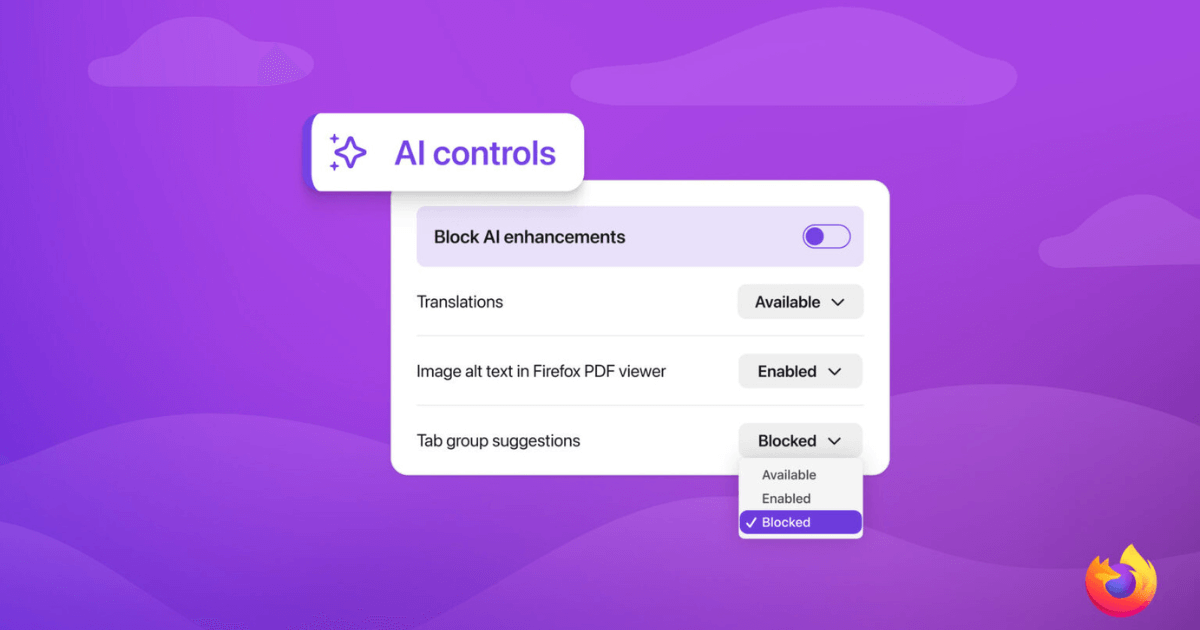
Mozilla is officially rolling out Firefox 148 to the global public. The marquee feature isn’t a revolutionary speed boost or a new privacy protocol—it is a giant “Block AI Enhancements” panic button. Here is why this desperate attempt at damage control is too little, too late.
If you have to build a literal “kill switch” into your software just to stop your own user base from rioting, you have already lost the plot.
For the last decade, Firefox has been the ultimate refuge for tech enthusiasts. Whenever Google Chrome pushed another memory-hogging update, or Microsoft Edge tried to force-feed us Copilot, we proudly pointed to Firefox. It was the last major independent, privacy-first browser that just let you browse the web in peace.
But that era is officially over.
In late 2025, Mozilla’s new leadership announced a massive pivot, declaring their intention to transform Firefox into a “modern AI browser.” After facing unprecedented backlash from their fiercely loyal community, Mozilla scrambled to build an “AI Kill Switch” into tomorrow’s Firefox 148 update.
Mozilla is spinning this kill switch as a victory for “user choice.” But as a long-time web developer and privacy advocate, I am not buying the corporate PR. Here is why the Firefox AI kill switch is a massive red flag, and why I am finally migrating my daily browsing to open-source alternatives.
What Actually is the Firefox “Kill Switch”?
Starting tomorrow with Firefox version 148, users will see a new “AI Controls” section in their desktop browser settings.
At the very top of this menu sits a toggle labeled “Block AI enhancements.”
If you leave this toggle alone, Mozilla is going to start slowly integrating generative AI into your daily workflow. This includes AI-enhanced tab grouping, link previews that use AI to summarize destination pages, automatic alt-text generation for PDFs, and a persistent sidebar chatbot that connects to third-party LLMs like Anthropic’s Claude, ChatGPT, and Google Gemini.
If you flip the “Block” toggle, Mozilla promises that all of these features will instantly vanish, and you will never see a pop-up prompting you to use them again.
On the surface, this sounds like a great compromise. But if you understand how modern software architecture works, the inclusion of this switch reveals a dark truth about the future of the browser.

The “Opt-In” Illusion
My biggest issue with the Firefox 148 update is the sheer amount of bloat it introduces to my hard drive.
Mozilla claims that these AI features are “opt-in” and that AI models are only downloaded if you actually use them. But the reality of a kill switch implies that the underlying telemetry, API hooks, and UI architecture for these AI tools are now permanently baked into the core Firefox code.
Much like the recent Android Ghost Patch disaster, tech companies are silently restructuring background services without asking us. Even if you hit the kill switch, you are still running a browser that was fundamentally redesigned to act as a wrapper for generative AI. You are carrying the weight of the AI infrastructure, even if you have the UI hidden.
The Betrayal of the 3%
To understand why the community is so furious, you have to look at the market data. Firefox currently holds less than 3% of the global browser market share.
The people using Firefox in 2026 did not end up there by accident. We are power users, developers, journalists, and privacy advocates. We specifically went out of our way to download Firefox because it lacked the aggressive data-harvesting and AI-pushing agendas of Big Tech. We actively rejected Chrome’s Gemini and Edge’s Copilot.
By trying to chase the AI hype train to appease investors, Mozilla alienated the only demographic keeping them alive.
When your entire brand identity is built on being the “anti-Chrome,” you cannot suddenly introduce Chrome’s most controversial feature and expect a toggle switch to fix the broken trust. We don’t want the option to turn off AI. We want a browser that doesn’t waste engineering resources developing it in the first place.
Where Do We Go From Here? (The Alternatives)
If, like me, you are refusing to update to Firefox 148 and want to jump ship before the AI sidebar takes over your screen, you have three excellent, privacy-respecting options left in 2026:
1. LibreWolf: This is currently my top recommendation. LibreWolf is a custom, independent fork of Firefox. It takes the core, open-source Firefox engine, strips out all the telemetry, removes the Pocket integration, and completely excises the new AI code. It is exactly what Firefox used to be five years ago.
2. Brave Browser: Yes, Brave is based on Google’s Chromium engine, and yes, it has its own AI assistant (“Leo”). However, Brave’s core mission remains aggressively anti-tracking. Their ad-blocker is built directly into the network level, and their AI tools are easily disabled without feeling like they are compromising the browser’s speed.
3. Mullvad Browser: Built in collaboration with the legendary Tor Project, the Mullvad Browser is designed for ultimate anonymity. It doesn’t remember your history, it blocks all trackers, and it certainly doesn’t have a generative AI chatbot reading your tabs. It is overkill for casual browsing, but perfect for sensitive research.

The Verdict: The Death of an Era
I have used Firefox since it was called “Phoenix” back in 2002. Uninstalling it today genuinely feels like saying goodbye to an old friend.
But trust is a fragile thing in the cybersecurity world. A kill switch is just a bandage over a philosophical shift. Mozilla has made it clear that they view generative AI as the future of the web. I fundamentally disagree. I want my browser to be a dumb, lightning-fast window to the internet—not an “intelligent copilot” reading over my shoulder.
Until Mozilla realizes that their greatest strength is what they don’t include, my default browser setting is staying firmly on LibreWolf.
Are you hitting the AI Kill Switch tomorrow, or are you finally uninstalling Firefox? Let me know your new browser of choice in the comments below.
ALSO READ :
Windows 11 KB5077181 is Breaking Wi-Fi and DHCP. Here is the 30-Second Fix.
Amazon’s AI Bot “Kiro” Just Nuked an AWS Environment. Naturally, Amazon Blamed a Human.