
For over a decade, cybersecurity professionals have given the same advice: “Never download a PDF from an untrusted source. Just open it inside Google Chrome.”
The logic was sound. Chrome utilizes a highly restricted “sandbox” environment. If a PDF contained malicious code, the theory was that the code would be trapped inside the browser tab, completely isolated from your actual computer hardware and personal files. It was the ultimate safety net.
As of late February 2026, that safety net has been completely shredded.
Security researchers have uncovered a massive, actively exploited vulnerability in Chrome’s built-in PDF rendering engine. Hackers are utilizing a zero-click exploit to bypass the browser sandbox and install a stealthy backdoor dubbed “Trinper.” If you use Chrome Version 134 or earlier, merely clicking a link to view a PDF online is enough to compromise your entire system.
Here is a deep dive into how the Trinper exploit actually works, why “zero-click” threats are the most dangerous attacks on the internet right now, and the exact settings you need to change today to protect your machine.
How the “Trinper” Backdoor Works
To understand why this hack is so devastating, you have to look at how modern browsers handle documents.
When you click on a PDF link, Chrome doesn’t just display a static image. It actively renders fonts, processes embedded JavaScript (used for fillable forms), and handles complex formatting layers. The Trinper exploit specifically targets a memory corruption flaw within Chrome’s font-rendering library.
Hackers are crafting malicious PDF files with corrupted custom fonts. When Chrome attempts to read and display these fonts, the memory buffer overflows. This overflow allows the attacker’s code to escape the Chrome sandbox and execute directly on your Windows or Mac operating system.
Once the sandbox is broken, the Trinper payload silently installs itself in your background processes. It is a “Remote Access Trojan” (RAT) designed specifically to steal session cookies. This means the hackers don’t even need your passwords—they can steal your active login tokens and instantly access your Gmail, bank accounts, and cryptocurrency wallets without triggering two-factor authentication (2FA).
The Terror of the “Zero-Click” Exploit
The most terrifying aspect of the Trinper vulnerability is the delivery method.
Historically, getting hacked required the user to make a mistake. You had to physically download a file, ignore a Windows Defender warning, and double-click an executable program (.exe).
Trinper is a zero-click exploit. You do not have to download anything to your hard drive. You do not have to click “Enable Macros.” You do not have to type in a password.
All you have to do is click a link on a webpage that points to a PDF. The moment Chrome’s built-in viewer attempts to open the document in a new tab, the malicious code executes in milliseconds. By the time you realize the PDF looks suspicious, the backdoor is already installed, and your session tokens are being transmitted to a command-and-control server.
Opening a PDF inside Chrome used to be the safest option. Today, it is a massive liability.
How to Fix It: Disable the Chrome PDF Reader
Google is currently rushing to patch this vulnerability in an upcoming Chrome 135 emergency release. But until that patch is globally distributed and verified, leaving your built-in PDF reader enabled is a massive, unnecessary risk.
You need to force Chrome to download PDFs to your hard drive instead of opening them automatically. This allows your dedicated antivirus software (like Windows Defender or Malwarebytes) to scan the file before it is rendered.
Step-by-Step Mitigation:
- Open Google Chrome.
- Click the three vertical dots in the top-right corner and select Settings.
- On the left-hand menu, click on Privacy and security.
- Click on Site settings.
- Scroll all the way down and click on Additional content settings to expand the menu.
- Click on PDF documents.
- Change the default behavior from “Open PDFs in Chrome” to “Download PDFs.”
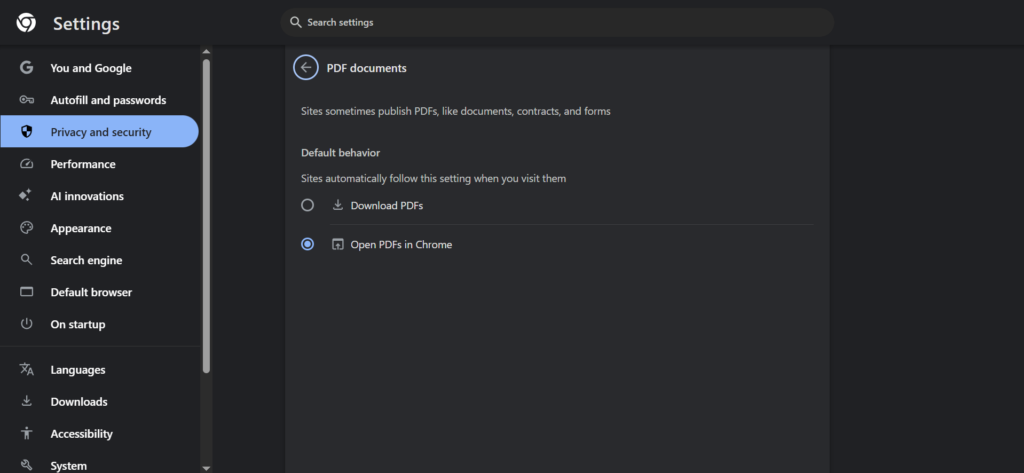
Force Chrome to download PDFs externally so your local antivirus can scan them before execution.
The Verdict: The Sandbox is Failing
The Trinper exploit is a harsh reminder of a growing trend in cybersecurity: browser sandboxes are no longer impenetrable fortresses.
As web browsers become more complex—adding AI sidebars, advanced media rendering, and deep OS integration—their attack surfaces expand exponentially. Every new convenience feature is a potential backdoor.
Until Google officially patches this memory corruption flaw, treat every PDF link with extreme caution. Change your settings, rely on dedicated, offline PDF readers like Adobe Acrobat or Foxit (which have entirely different security architectures), and ensure your operating system’s built-in antivirus is fully updated.
Have you disabled the Chrome PDF reader yet? Let me know in the comments if you prefer using a third-party app for your documents!
Also read:
GTA VI Reportedly Delayed to 2027? Why the “Official Denial” Should Worry PC Gamers.
Firefox Just Added an “AI Kill Switch”: Why I’m Switching Browsers Today