
We are currently witnessing a massive disconnect in the tech industry. While Microsoft spends billions of dollars shoving Copilot AI into every conceivable menu, taskbar, and Office application, the core foundation of the Windows operating system is crumbling under the weight of unpatched exploits.
This week, Microsoft released its February 2026 Patch Tuesday update. For system administrators and cybersecurity analysts, the second Tuesday of the month is always stressful. But this month’s release isn’t just a standard list of minor bug fixes. It is a certified bloodbath.
Microsoft addressed 59 vulnerabilities in this patch, which is fairly standard. What is absolutely terrifying, however, is that six of these vulnerabilities are active zero-days currently being exploited in the wild by threat actors.
I spent this morning reviewing my own system update logs and testing the exploit parameters on a sandbox machine. The reality of these zero-days is grim: your built-in Windows Defender and SmartScreen prompts will not save you. Here is exactly what is happening under the hood of your PC, and the manual steps you must take to secure your system today.
The “Big Three” Security Bypasses
The most alarming aspect of the February 2026 patch cycle is a trio of zero-day vulnerabilities specifically designed to bypass Windows security features. These are not theoretical exploits; hackers (including the Russian-nexus threat actor APT28) are actively using them to compromise machines.
1. The Windows Shell Bypass (CVE-2026-21510) With a CVSS severity score of 8.8, this is the most critical threat facing average consumers right now. The Windows Shell is the graphical interface you interact with every day—the desktop, the taskbar, and the file explorer. This zero-day allows an attacker to completely bypass Windows SmartScreen and the Mark-of-the-Web (MoTW) protections. If an attacker convinces you to click a malicious link or shortcut (.lnk) file, the malicious code executes immediately without any warning prompts.
2. The MSHTML Framework Flaw (CVE-2026-21513) Internet Explorer might be dead to consumers, but its underlying engine (Trident/MSHTML) is still buried deep inside Windows. Attackers are exploiting this legacy code. By tricking a user into opening a manipulated HTML file, hackers can circumvent critical protection layers and force the operating system to execute unverified payloads.
3. The Microsoft Word OLE Exploit (CVE-2026-21514) If you use Microsoft 365 or Office, you are in the crosshairs. This zero-day allows attackers to bypass Object Linking and Embedding (OLE) mitigations. All it takes is opening a single weaponized Word document. Once opened, the document introduces unsafe COM/OLE controls directly into your trusted Office workflow, granting the attacker initial access to your files.
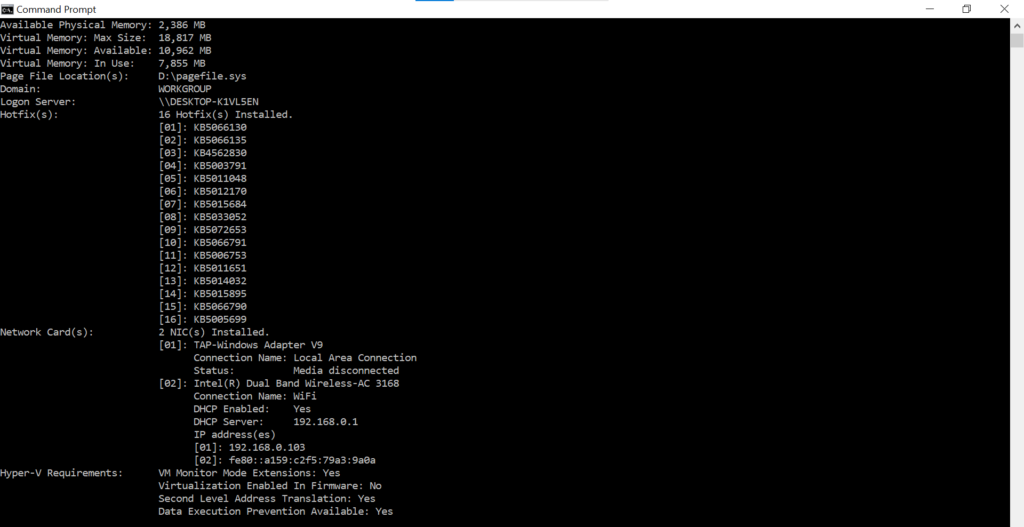
If your update history doesn’t show the February 2026 patch, your machine is currently vulnerable to all six zero-days.
The Privilege Escalation Nightmares
Getting a victim to click a malicious link is only the first step of a cyberattack. Once the hackers have a foothold, they need to escalate their permissions so they can take full control of the computer. The February update confirmed that attackers already possess two zero-days to do exactly that.
Desktop Window Manager (CVE-2026-21519) For the second month in a row, the Windows Desktop Window Manager (DWM)—the service responsible for visual effects like window animations and transparency—is the site of an exploited-in-the-wild vulnerability. This is a “type confusion” flaw. If an attacker already has low-level access to your PC, they can exploit the DWM to instantly elevate their permissions to “SYSTEM” privileges. This grants them the keys to the entire kingdom.
Windows Remote Desktop Services (CVE-2026-21533) If you use Remote Desktop (RDP) to access your work PC from home, pay attention. This zero-day modifies a service configuration key, replacing it with an attacker-controlled key. It enables an adversary to seamlessly add a new, invisible user to your local Administrator group.
The “Senior Analyst” Reality Check
As a tech analyst, looking at the full scope of this Patch Tuesday release is incredibly frustrating.
Microsoft is desperately trying to convince the enterprise market that their AI tools are secure and ready for mass deployment. Yet, in this very same patch drop, they had to fix Remote Code Execution (RCE) and security bypass vulnerabilities inside GitHub Copilot and Visual Studio (CVE-2026-21516, CVE-2026-21518).
We are witnessing a massive technical debt crisis. Microsoft is layering highly complex generative AI features on top of a legacy operating system that still relies on MSHTML—an engine built in the 1990s. Hackers are not breaking into systems using sophisticated AI; they are simply kicking open the rotted wooden doors of the Windows Shell.
Until Microsoft pauses its relentless AI feature-drop schedule to actually rewrite and secure the core foundation of Windows 11, users are essentially acting as unpaid beta testers for threat actors.
How to Protect Your PC Right Now
Do not wait for Windows to decide it is time to reboot your computer. You need to manually intervene today.
- Force the Update: Go to Settings > Windows Update and click “Check for updates” right now. Ensure the February 2026 Cumulative Update downloads and installs, and immediately restart your PC.
- Disable the Preview Pane: Open your Windows File Explorer, click “View,” and ensure the “Preview Pane” is turned off. Many OLE and MSHTML exploits trigger automatically if Windows tries to render a preview of a malicious file.
- Audit Your RDP: If you do not actively use Remote Desktop Services, turn it off. Go to Settings > System > Remote Desktop and toggle it to the “Off” position to instantly mitigate CVE-2026-21533.
The era of trusting SmartScreen to catch malicious files is over. Keep your system updated, and if a Word document from an unknown sender lands in your inbox, delete it immediately.
Have you installed the February patch yet? Have you noticed any strange behavior on your PC since the update? Let me know in the comments.
Also read:
GTA VI Reportedly Delayed to 2027? Why the “Official Denial” Should Worry PC Gamers.
Firefox Just Added an “AI Kill Switch”: Why I’m Switching Browsers Today